Veeam · Enterprise Backup, Recovery & Data Protection Platform

From virtualization to cloud SaaS,
full recovery for all enterprise data

Veeam is a unified backup and recovery platform built for data availability, reliability and strong ransomware defense. It protects on-premises legacy and virtualized environments, consolidates multi-cloud backup in one place, and delivers rapid ransomware recovery and backup automation on a single platform.

Why Softworks

How Softworks works with Veeam

01

Automated recovery verification with objective test reports

We continuously test whether backup data is actually recoverable using automated verification (SureBackup / SureReplica). Beyond simple testing, we provide a recovery verification report that measures actual recovery time and data integrity, proving recovery performance.

02

Backup load optimization built in from initial infrastructure design

We do not treat backup as an afterthought separate from infrastructure deployment. A single dedicated team delivers virtualization (VCF), VDI and DR deployment together, so the impact of backup traffic on production performance is calculated from the initial infrastructure design stage, preventing load problems at the source.

03

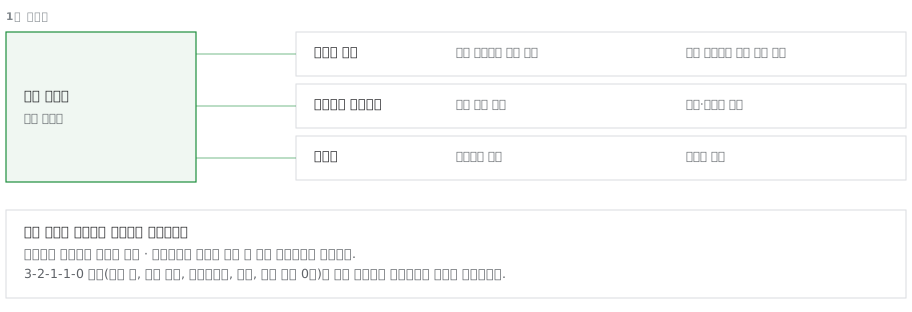
Delivering a '3-2-1-1-0' backup design for strong ransomware defense

We design data protection on the assumption that ransomware attacks are routine. Based on the 3-2-1-1-0 rule, the current global standard, our recommended backup environment includes immutable repositories that even administrators cannot delete or alter, plus remotely isolated offline copies, as standard.

04

Measurement-based sizing shortens backup time and reduces deployment and operating costs

Instead of relying on rough estimates, we measure the actual data environment and size the backup infrastructure (proxies and storage) to exactly what is needed. By combining deduplication with dedicated WAN acceleration, we significantly shorten the backup window while reducing both storage purchase and network line costs.

Scope of Work

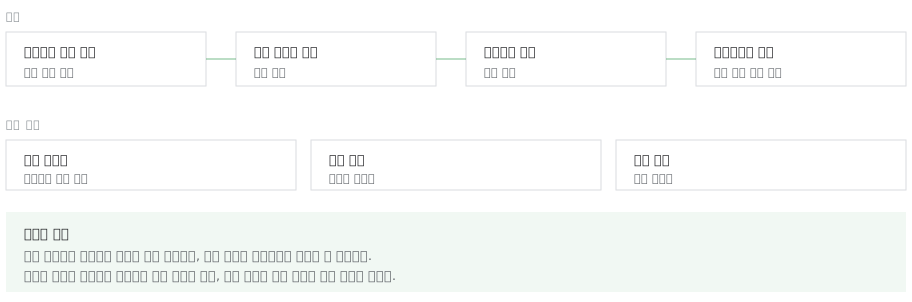
From assessment to operations: what Softworks covers

Assess

Assessment

Protected asset inventory · Data growth analysis · RPO / RTO targets · License sizing (recalculated when moving to instance-based licensing) · Regulatory retention requirements

Design

Design

Backup policy (frequency · generations · retention) · Transport mode · Proxy placement design · Repository tier design (performance · capacity · archive) · Immutable repository and offsite design · Recovery scenario definition

Build

Deployment

Deployment and policy rollout · Integration requirements confirmed (vCenter registration · firewall ports) · Initial full backup · Performance tuning

Verify

Verify

Automated recovery verification setup · Recovery testing (file · VM · application level) · Security and configuration checks passed

Operate

Operations

Backup success rate monitoring · Failed job handling · Capacity expansion planning · Regular recovery drills

Knowledge Base

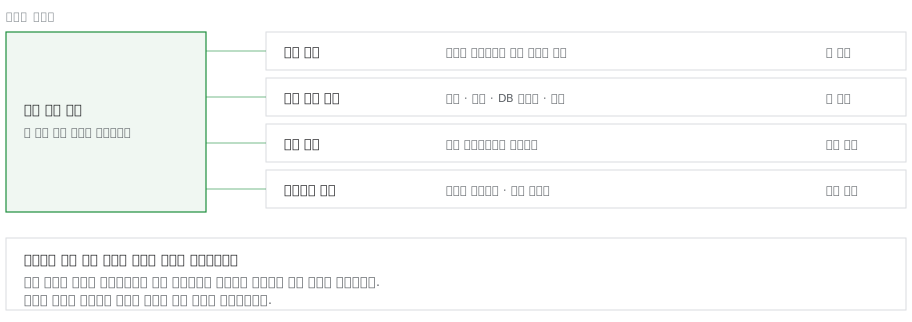
Realistic, thorough backup policy and capacity management are essential

For a backup policy to work, accurate capacity and time sizing is essential. In the field, the real cause of failures, more frequent than ransomware, is backup repositories running out of space. Softworks builds backup policies on clearly documented sizing, not rough estimates, and secures safe margins for both time (the backup window) and capacity so backup jobs never affect business hours.

  • Formula-based capacity sizingSizing basis documented, including full, incremental and adjustments
  • Recovery test reportMeasured recovery times submitted
  • Security and configuration checksUnimplemented items listed before handover
  • Virtual · Physical · CloudDesigned under a single policy framework

Accumulated Assets

  • Protected asset inventory template
  • Data growth estimation sheet
  • Backup capacity sizing formula (Full + Incremental × Generations + Adjustment)
  • Transport mode selection criteria
  • Repository tier placement patterns
  • Backup window design grid (day · hour)
  • Recovery test scenarios (file · VM · DB · bare metal)
  • File recovery procedures by OS (step counts differ between Windows and Linux)
  • Integration prerequisites checklist (registration · ports · permissions)
  • Security and configuration checklist
Field Issues

Six challenges commonly seen in the field

Challenges in the FieldThe Softworks Approach
“We back up daily but have never tested a restore”We build automated verification to confirm that backup data actually recovers in real situations, and we include regular recovery drills in the operations manual to strengthen response readiness. We then issue a recovery verification report detailing the recovery time (RTO) measured during the drills, providing objective proof of recovery performance
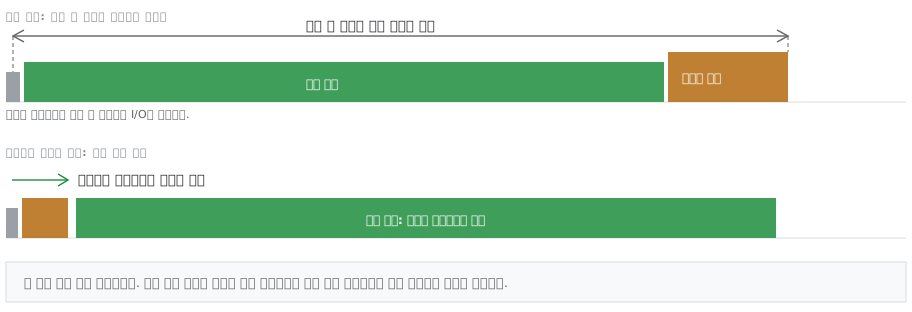
“Backup jobs run into business hours”Allowed backup days and hours are set in a detailed grid (schedule), and backup jobs are automatically terminated when they exceed the allowed window. Carrying one backup generation forward is far better for service continuity than slowing down production servers. This prevents backup finalization (snapshot commit) from overlapping user peak hours and causing lag
“Backups show as successful, but the transaction logs are empty”When multiple DBMSs are installed on one server, a backup may process only one DBMS and miss the others. Softworks identifies these multi-DBMS servers in advance and configures a separate, independent backup job for each DBMS so that every database is backed up without exception
“Free repository space keeps shrinking”This is the most common failure risk in a newly handed-over backup environment. Softworks recalculates retention cycles and synthetic full backup schedules from scratch and sets storage threshold alerts immediately to prevent capacity exhaustion. Capacity is then reallocated efficiently by tier (high-performance storage / long-term retention storage) according to the nature of the backup data
“Ransomware encrypted our backups too”We block the most damaging incident of all: secondary infection of backups. Immutable repositories that even administrators cannot modify or delete, plus isolated independent copies, are part of the standard configuration. During backup, abnormal encryption of data (a sign of ransomware) is detected in real time, and suspect backups are automatically excluded from recovery candidates with an alert logged
“Physical servers, cloud and SaaS are managed in separate systems”We fully redesign fragmented backup systems so they can be managed at a glance from a single unified console. Agents are deployed in bulk to multiple physical servers for automatic installation, and rescan logs confirm that every target is included in backup with nothing missed

“Backup jobs run into business hours”

Snapshot lifecycle window in which commit begins after backup completes
Vendor Insight

Data protection design based on Veeam technical materials

Installation alone does not complete a protection framework

Running the built-in dashboard and security analyzer shows unapplied items as numbers. The values below come from vendor materials and illustrate the state immediately after deployment.

  • 33%Share of all workloads with a backup policy actually applied and running
  • 35%Share of existing backups with immutability applied
  • Off by defaultConsole multi-factor authentication and auto logoff (both must be enabled)
  • 37Check items (14 security + 23 product configuration)

Results achieved through design

  • 5.1xReduction ratio after deduplication and compressionMeasured across 3 restore points of the same job
  • 37Check items confirmed as passed before handoverPeriodic recheck when scheduled
  • 8Virtualization platforms integrated without agentsScope confirmed down to version ranges
  • 1 min 43 sRemote agent deployment to one physical serverPackage upload 5 s + installation 1 min 9 s

Backup data transfer paths

The backup server only sends commands; actual data flows through proxies to the repository. Which path to read from and which tier to store on are the two axes of the design.

Architecture — Backup server (sends commands only) → backup proxy (3 transport modes: direct storage access · virtual appliance · via management network) → repository tiers (performance · capacity · archive). Actual data bypasses the backup server and travels directly from the proxy to the repository.

  • Read pathOperational load varies by transport mode
  • Storage tiersThree tiers: performance · capacity · archive
  • Protection layerImmutable repositories and inline detection
  • Recovery pathsFrom Instant Recovery to bare metal

Capacity is sized by formula

  • 1 FullBaseline full backupStarting point for initial sizing
  • + Incremental × generationsAccumulates over the retention cycleDaily incrementals for each day of retention
  • + AdjustmentSynthetic full backups · headroomActual usage exceeds the formula value

Ransomware response is visible on screen

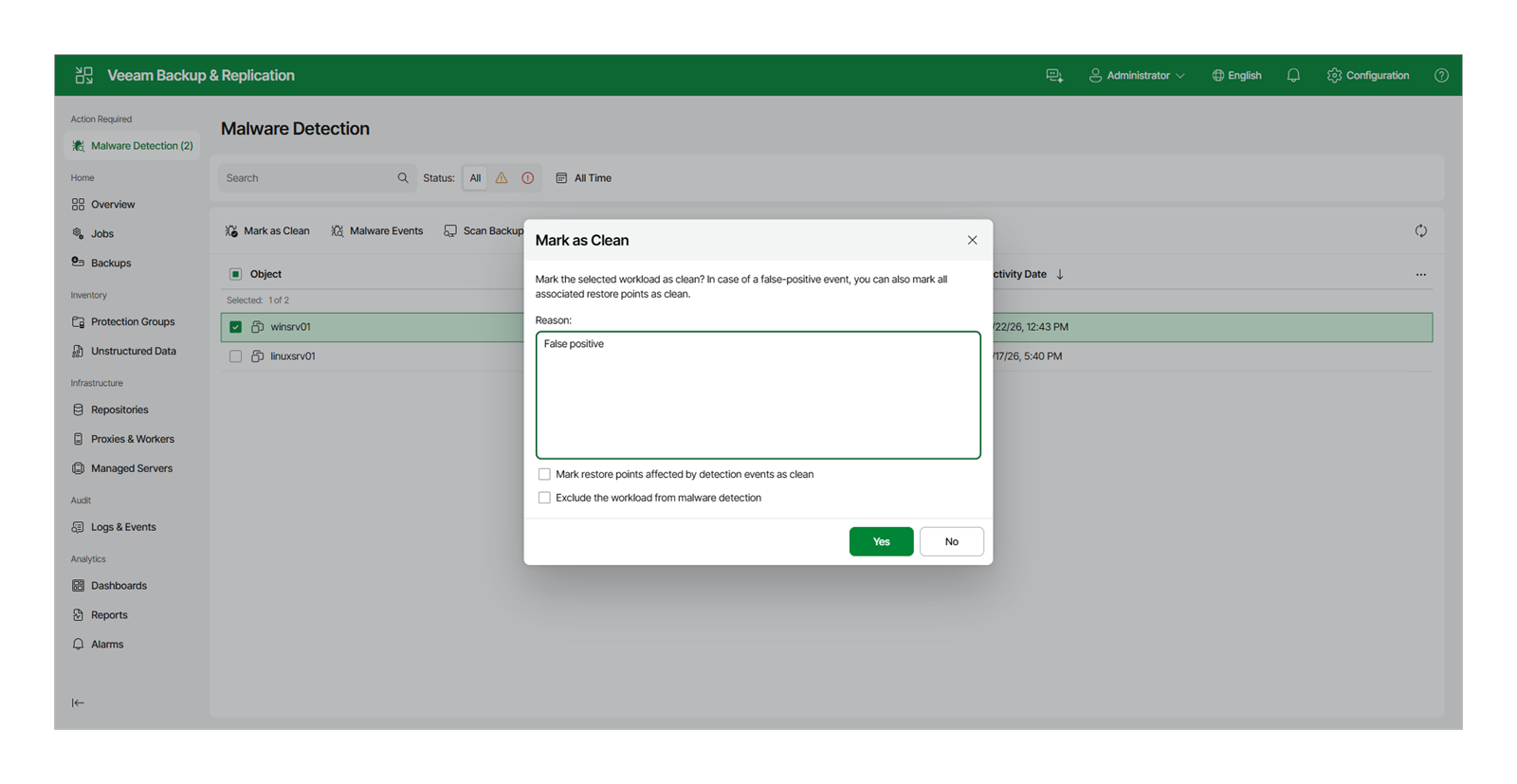
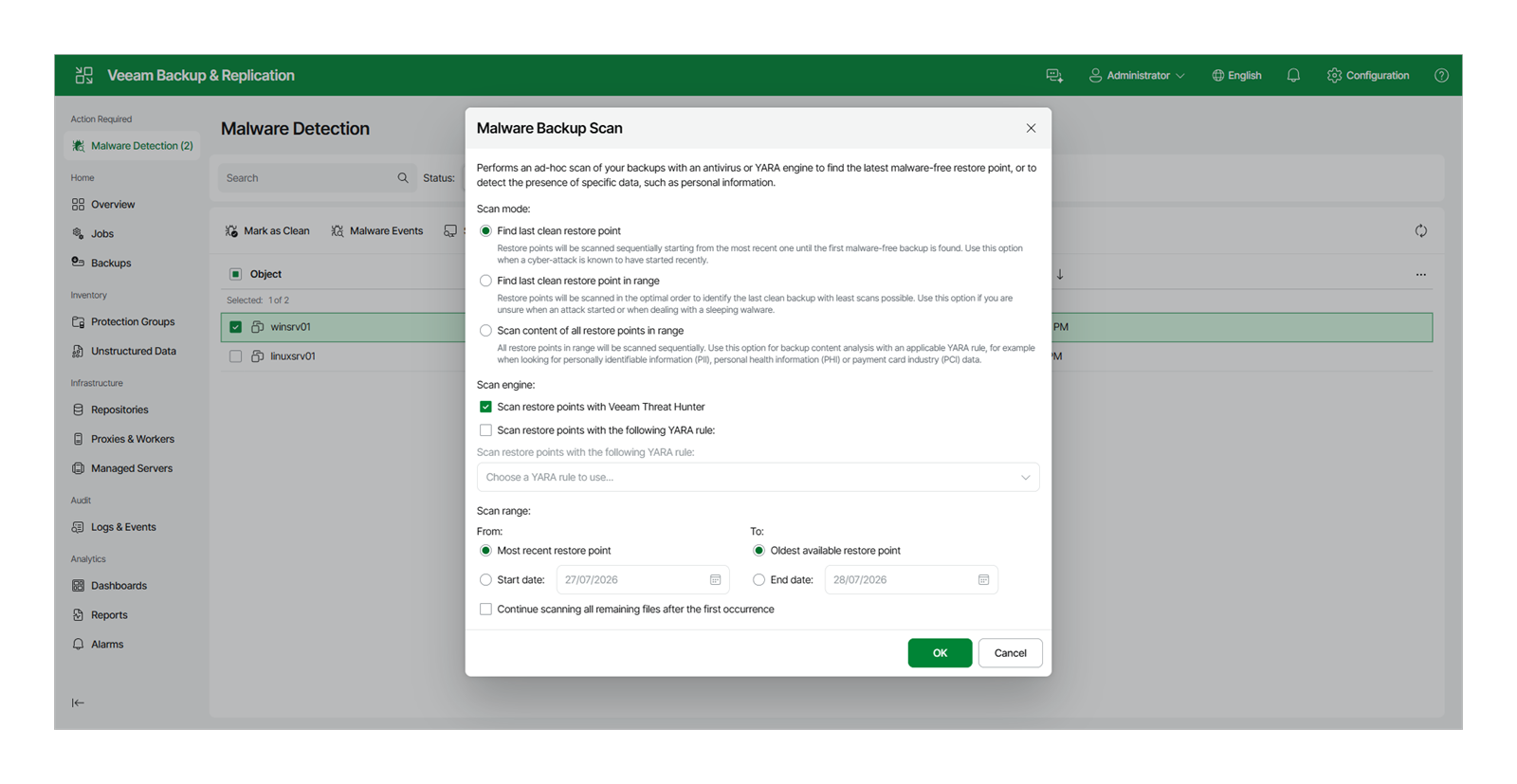
Below are console screens published in Veeam's official product documentation. For each screen, we list what Softworks decides and the deliverables provided.

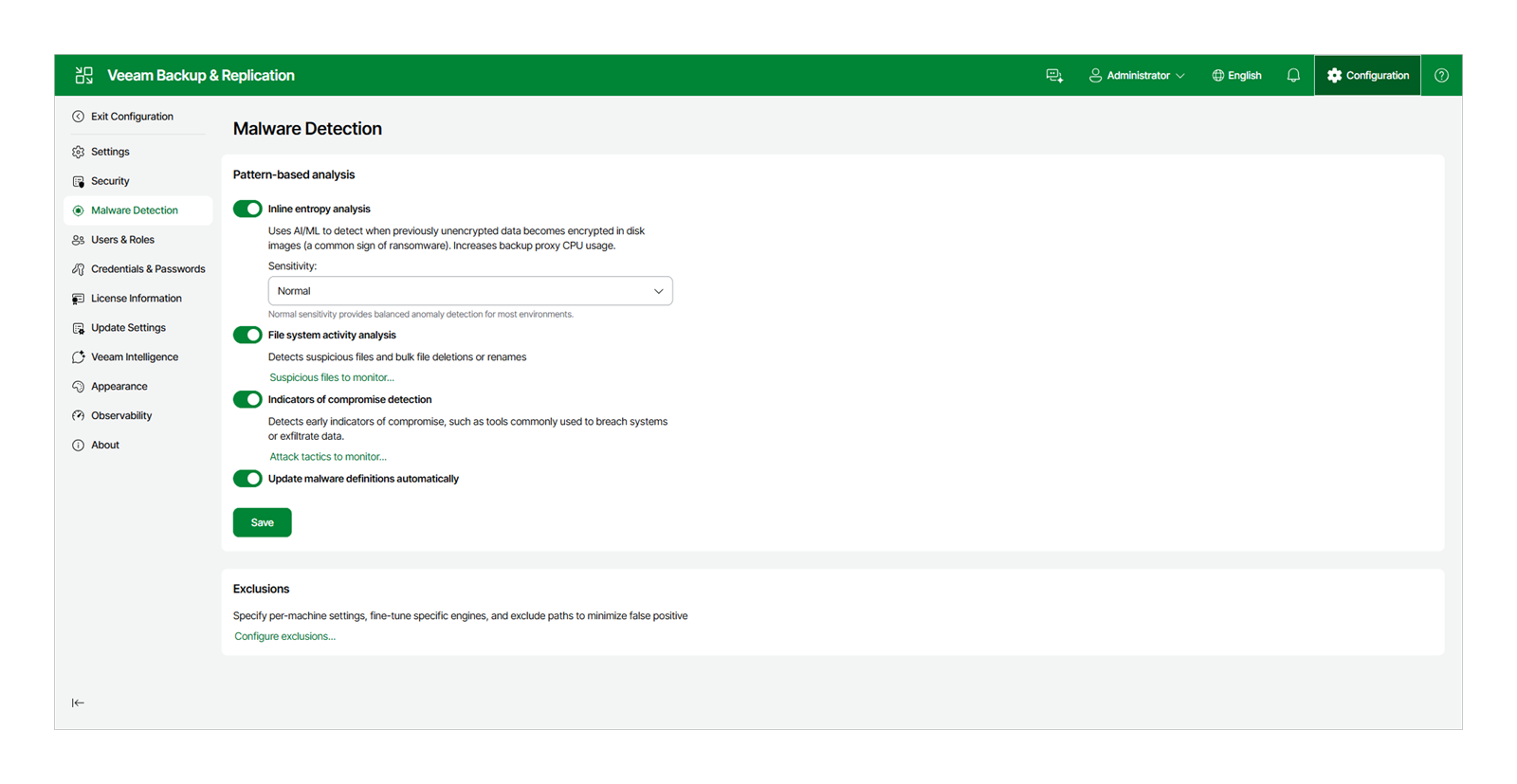
  • Detection settings
    Detection settings

    Setting detection sensitivity first

    Inline entropy analysis, file system activity analysis and indicator-of-compromise detection are each enabled separately. Sensitivity starts at the default and is raised after a 2–4 week false-positive baseline is established. Because entropy analysis increases proxy CPU usage, it is enabled only after confirming the backup window has headroom.

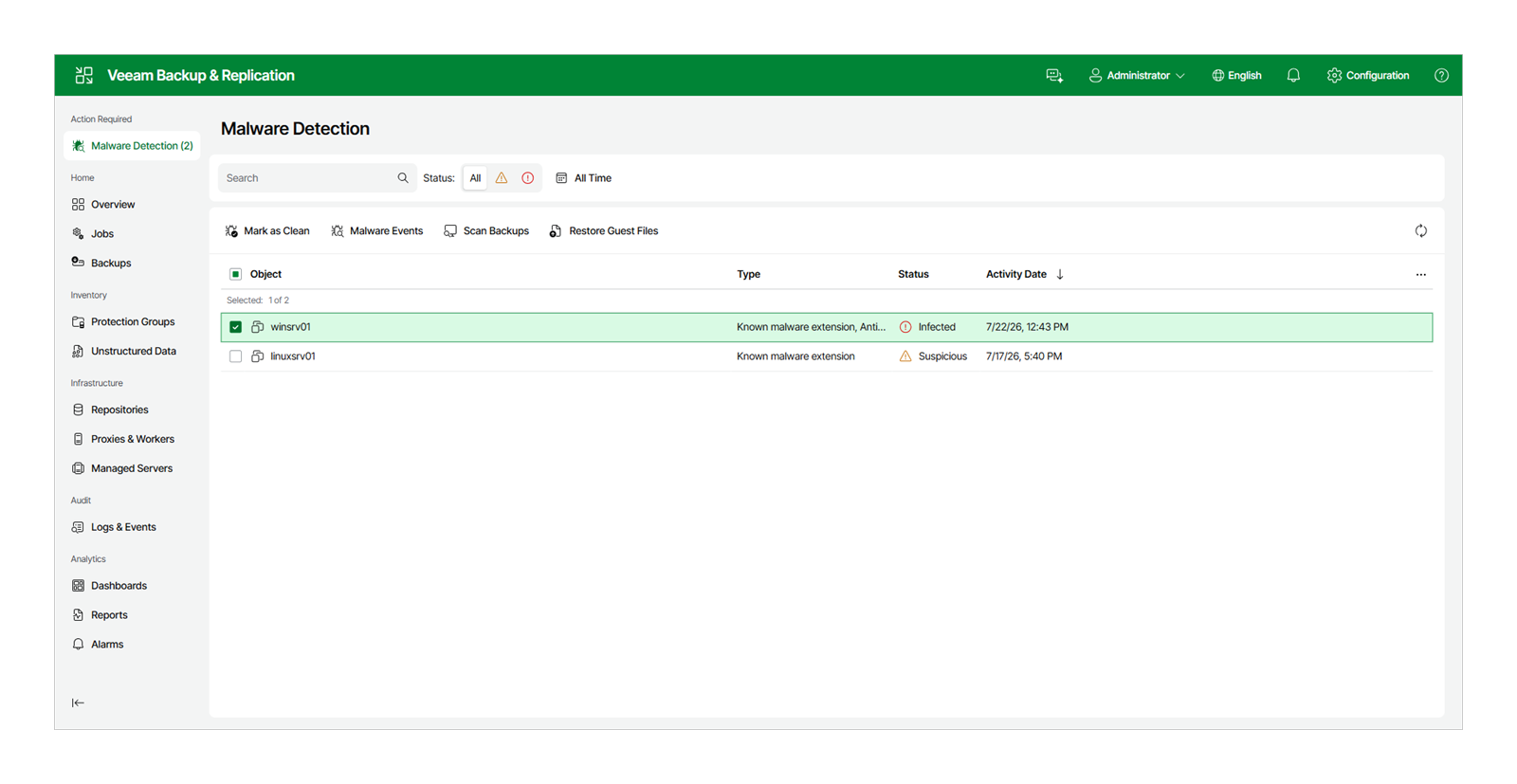
  • Detection status
    Detection status

    Infected and suspicious verdicts are recorded per object

    Infected and suspicious items are marked separately, and flagged restore points are automatically excluded from recovery candidates. Softworks verifies the last clean restore point before starting recovery.

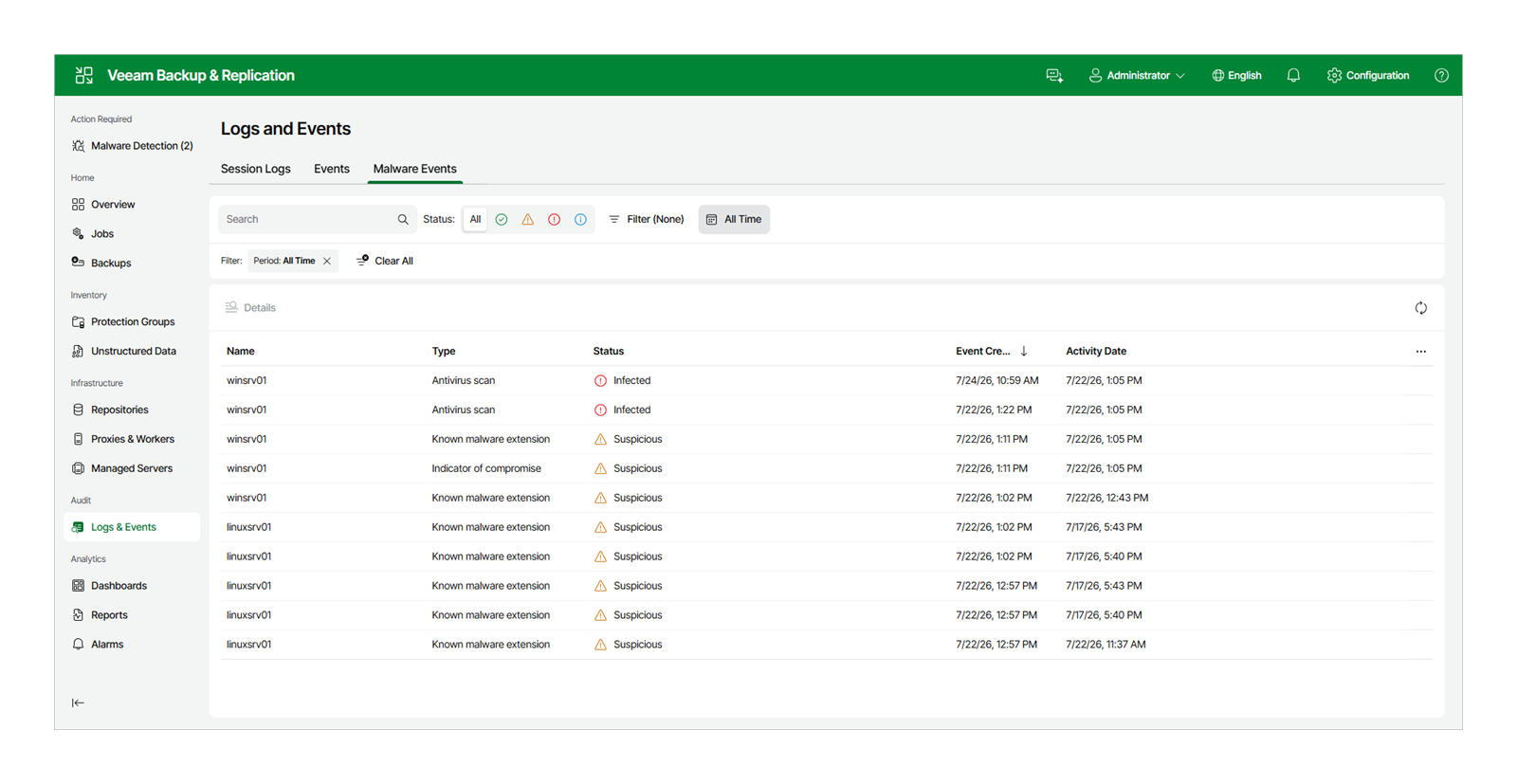
  • Event log
    Event log

    Each detection is tracked by type and time

    Detection types and times accumulate in the audit log. Each incident is also recorded in the monthly report with its cause and resolution.

  • Post-backup scan
    Post-backup scan

    Existing backups are included in rescans

    Restore points from before real-time detection was enabled are checked with a post-backup scan. This is the first task we perform when taking over an operating environment.

Items confirmed first in the field

CategoryFeatureDescription
Integration requirementsPorts confirmed before work beginsWe register vCenter or hosts with the backup server, secure datastore connectivity for SAN backup, and confirm both the management communication ports and, where proxies are separate, the data transfer ports. Without these prerequisites in place, the first backup job has to wait for firewall approval.
LicenseProtected quantities are recalculated when switching licensesBecause the required quantity changes when moving from socket-based to instance-based licensing, protected workloads are recounted and confirmed before design.
Recovery procedureThe same task takes a different number of steps on each OSFile-level recovery procedures also differ between Windows and Linux; Linux requires an additional helper appliance, which adds steps. Procedures are written separately for each OS.
Protection scopeSupport scope specified by platform and versionInstead of stating “virtualization supported,” we specify which platforms and which version ranges are covered. Summarizing scope in a single line leads to differing interpretations later.

SourcesFigures are based on Veeam technical materials and measured logs from Softworks deployment manuals. Dashboard values are examples from a specific environment and will vary by customer environment. Screens are console screenshots published in Veeam's official product documentation (Veeam Help Center), not from customer environments.

Components

The six components of Veeam

Several layers are involved in reading, storing, protecting and recovering backup data. Here is how each layer works and what Softworks decides beforehand.

01

Backup proxy · Transport modes

Determining the data transfer path

Proxies read data in one of three ways: connecting directly to storage to read blocks, placing the proxy inside the target cluster and attaching virtual disks, or going through the management network. The method chosen determines the load on the production network and the hypervisor.
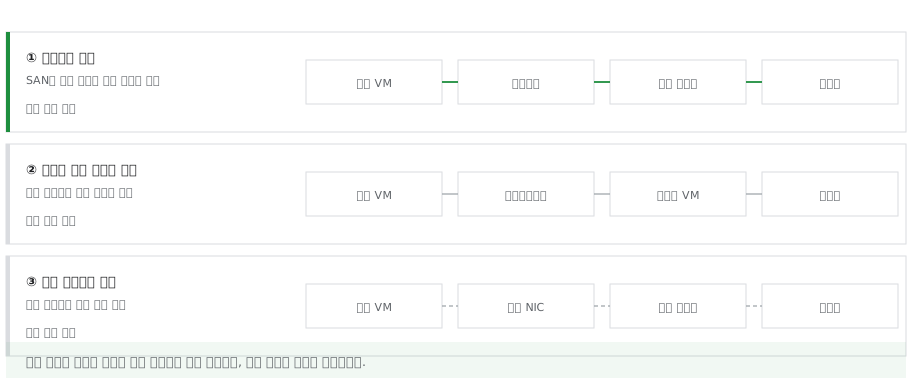
Data paths that vary across 3 transport modes
What Softworks Does

We first review the customer's storage configuration and assign a transport mode to each job. Datastores that support direct access use direct storage access; for the rest, a proxy is placed in the relevant cluster so no traffic crosses the management network. Communication ports between proxies and repositories are listed in the firewall request before deployment.
02

Repository tiers

The repository consists of three tiers

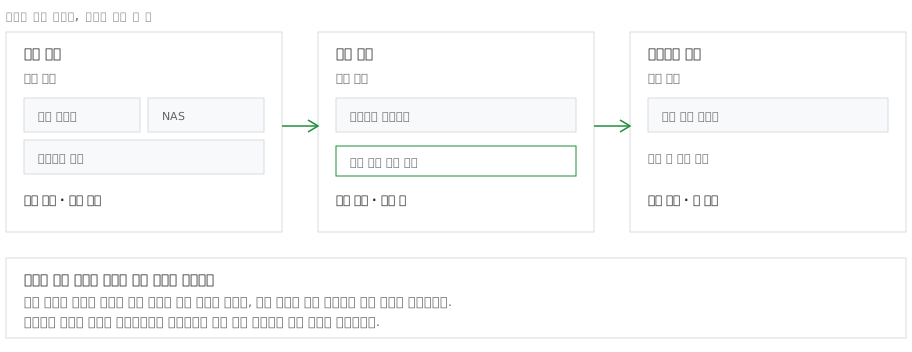
The performance, capacity and archive tiers are combined into a single logical repository. Direct-attached disks or deduplication appliances serve the performance tier, object storage the capacity tier, and long-term retention classes the archive tier, with data moving between tiers automatically by policy.

Three-tier repository with boundaries set by recovery time objectives
What Softworks Does

Tier boundaries are set by recovery time objectives rather than retention periods. Restore points for workloads that need Instant Recovery stay on the performance tier, and only older restore points move to lower tiers with immutability applied. Because object storage also charges for reads and transactions, capacity sizing accounts for recovery test frequency.

03

Immutable repository · Inline detection

Anomalies are detected while data is being written

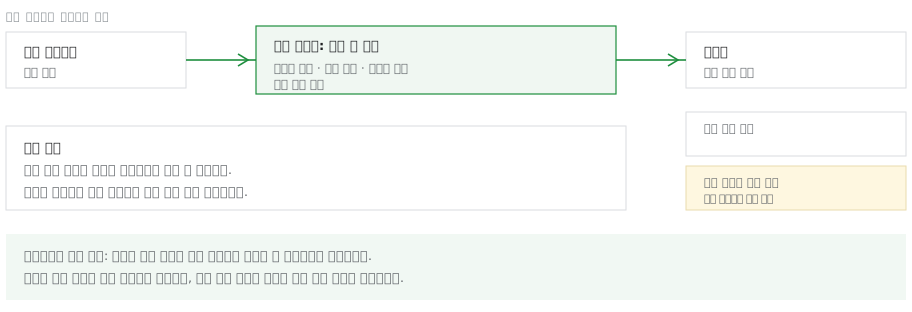
While backup data is written to the repository, it is checked for signs of encryption and abnormal changes. If a suspicious verdict is made, the restore point is flagged, and immutable copies cannot be deleted during the retention period, even with administrator privileges.

Anomaly detection during writes and restore point flagging
Screen for logging and clearing false positives
What Softworks Does

Detection sensitivity starts low and is raised step by step after a false-positive baseline is established. Flagged restore points are automatically excluded from recovery candidates, and the last clean restore point is verified before recovery begins. Each incident is recorded in the monthly report with its cause and resolution.

04

Recovery paths

Defining recovery scope first

Instant Recovery, item-level recovery, full recovery and bare-metal recovery all derive from a single backup. Item-level recovery supports not only files but also database tables and point-in-time restore, and full recovery can export to a platform different from the source.

Four recovery paths from a single backup
What Softworks Does

We designate and document one default recovery path per workload. Instant Recovery is a step to restore service quickly and does not include full restoration, so the procedure is written as one process through migration back to production storage. Each designated path is run every quarter to remeasure recovery time.

05

Physical servers · Bare metal

Bulk agent deployment and restore to dissimilar hardware

Agents are deployed remotely to physical servers from the console. Backup scope can be a full image, volume level or file level. For recovery, you boot from recovery media and can restore to different hardware and to disks of a different size.

From agent deployment to bare-metal recovery on dissimilar hardware
What Softworks Does

Deployment results are confirmed through rescan logs, and failures are handled separately. Because restoring to dissimilar hardware sometimes requires manual disk mapping, mapping rules for each target server are prepared in advance.

06

Offsite copy

Determining the offsite copy path

Copies are kept offsite through copy jobs, exported to object storage or written to tape. When bandwidth is limited, WAN acceleration is applied to reduce the volume transferred.

Three paths for exporting copies (offsite · object · tape)
What Softworks Does

Where line capacity cannot be increased, we adjust the transfer volume. Changed-block-only transfer is combined with compression and deduplication to fit within the transfer window, and line headroom is confirmed with measured transfer volumes. The documentation states which tier satisfies the 3-2-1-1-0 rule.

References

Customer References

Customer TypeProjectsDeployment Configuration
Enterprise · PharmaceuticalBackup solution deploymentUnified backup for virtual environments
Enterprise · ManufacturingPrimary site virtualization backup and near-real-time replicationBackup and replication in one framework
Public sector · Public institutionsBackup framework deployment including offsite copiesImmutable repository · Offsite copy
Operation & Support

Incidents are logged by severity

Each severity level has its own response start time and target resolution time. Configuration data of the backup system itself is included in backup scope; if it is missing, recovery stalls partway through.

  • Daily backup success rate monitoring
  • Same-day retry policy for failed jobs
  • Incident intake, response and resolution targets by severity
  • Managed regular recovery drills
  • Repository capacity expansion consulting
  • Self-backup of backup server configuration (immutable repository · encryption)
  • Regular rotation of credentials and encryption keys

We combine solutions from global technology leaders with Softworks' deployment and operations expertise to power our customers' digital and AI transformation.

Have you tested restoring your current backups?

We start by reviewing the protected asset inventory and recovery testing with you.

Request a Consultation →