Broadcom Private AI · Private AI Infrastructure Platform

“Strict security, complete AI services”
From infrastructure to model serving, on-premises Private AI delivered by Softworks

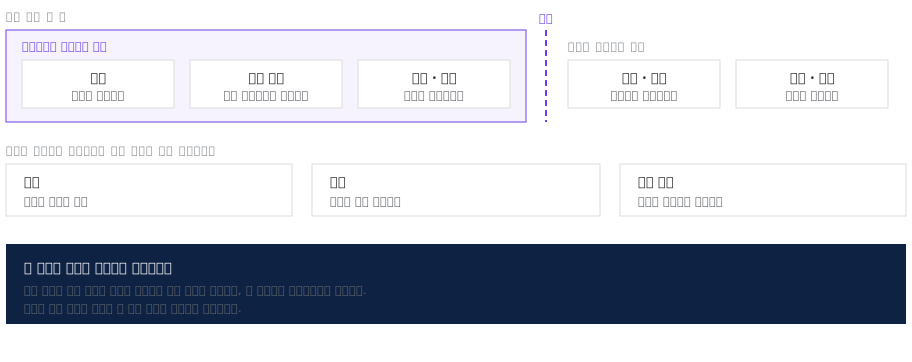
Every component, from GPU infrastructure to model repositories, inference runtimes and vector databases, runs securely isolated within the enterprise private cloud (VCF). You can adopt AI with confidence, without the risk of sensitive internal data and corporate knowledge leaking to external clouds or services.

Why Softworks

How Softworks approaches Broadcom Private AI

01

A complete Private AI environment, built on expertise proven in our own GPU solution

Efficient GPU partitioning and operating policies are best understood by a team that has built infrastructure solutions itself. Softworks designs Broadcom Private AI Foundation using know-how proven with its own GPU infrastructure solution (GenWorks). On a fully secure environment where no data leaves the organization, we deliver an AI platform on which the infrastructure and the AI services above it (LLM · RAG) run without bottlenecks.

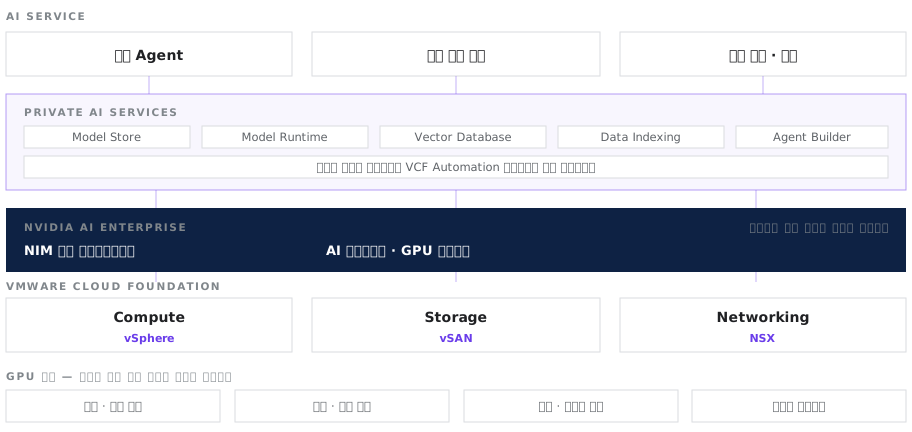
Private AI Services running on VMware Cloud Foundation, with GPU nodes partitioned differently by use
02

Full integration of virtualization and AI, delivered in one engagement with no additional solutions

Private AI runs on VMware Cloud Foundation (VCF), so the quality of the virtualization design determines AI performance. There is no need to procure separate solutions from multiple vendors. Softworks has hands-on experience designing and deploying the entire stack, from the underlying VCF virtualization infrastructure to AI model serving at the top. A single engagement delivers an environment where infrastructure and AI services are fully integrated.

03

On-premises Private AI that meets financial and public sector regulations

For AI adoption in financial and public institutions, the top priority is keeping data in-house and preventing external leakage. Softworks designs infrastructure to meet strict regulatory guidelines, covering network configuration, storage location and log export controls. We also provide license verification and controlled processes for securely importing models and containers.

04

Design GPUs around real ‘service targets’, not model size

The same AI model can require very different GPU resources depending on the number of concurrent users and response-time targets. Softworks first defines target performance for each service, then specifies accurate GPU quantities and the right partition sizes. The result is the most efficient GPU architecture for your actual service environment, without unnecessary infrastructure overinvestment.

Scope of Work

From assessment to operations: what Softworks covers

Assess

Assessment

Define AI use scenarios · Set target models and response goals · Identify data locations and export restrictions · Inventory existing GPU assets

Design

Design

Design GPU partition sizes and allocation policies · Size model serving resources · Configure vector databases and indexes · Design network configuration and data paths · Design VMware Cloud Foundation integration

Build

Deployment

Deploy Private AI Services · Configure NVIDIA AI Enterprise · Deploy model repository and runtimes · Validate performance

Serve

Configure serving for target models · Measure response latency and throughput · Apply access policies per user group

Operate

Operations

Monitor GPU utilization · Model replacement and version management procedures · Plan resource expansion

Knowledge Base

Eliminate GPU waste with precise Private AI resource partitioning

The real problem with AI infrastructure is not a simple lack of performance, but GPU monopolization by certain users and frequent idle resources. With virtualization and partitioning technology based on Broadcom Private AI Foundation, GPU resources can be divided flexibly as needed and allocated immediately where they are required. Utilization across the entire AI infrastructure is maximized with no wasted resources.

  • Partition Size CriteriaGPU allocation baselines by workload type
  • Serving SizingSized by concurrent users and response targets
  • Product Development ExperienceA track record of building our own GPU management product

Accumulated Assets

  • AI use scenario definition template
  • GPU partition size selection matrix (training · inference · development)
  • Model serving resource sizing formula (concurrent users × response target)
  • GPU scheduling policy patterns
  • Data export restriction checklist
  • Model replacement procedure
  • Knowledge base setup procedure (upload · indexing · validation)
  • Agent configuration procedure (model · knowledge base · permission linkage)
  • GPU utilization report template
Field Issues

Six challenges commonly seen in the field

Challenges in the FieldThe Softworks Approach
“We deployed GPUs, but one user takes them all”GPUs are partitioned and allocated, with caps set for each user group. Handling training, inference and development under the same policy causes conflicts, so partition sizes are designed differently for each use
“We deployed a model, but responses are slow”We first check GPU memory and compute headroom against model size and concurrent requests. A model that does not fit on one GPU because the partition is too small and requests piling up in a queue call for different fixes, so we determine which cause applies
“Our data cannot leave the premises”Models and vector databases are deployed inside the institution, and every path data takes during training and inference is mapped in diagrams. Points that touch the outside are identified separately, and controls for them are designed alongside
“We haven’t decided which model to use yet”Configuring the model repository and runtimes first makes the model a replaceable component. We finalize the infrastructure and serving framework before model selection, and design so that models are replaced after validation
“If we upload documents, will it answer right away?”Uploading documents to a repository and having the model find and use their content are different steps. The process runs in four stages — upload → indexing → knowledge base setup → agent connection — and each stage requires defining the document scope, update frequency and access permissions
“We are not sure it can run on our existing virtualization environment”Private AI runs on VMware Cloud Foundation, so we first assess the version of your current environment and its GPU support. Once the scope of prerequisite work is confirmed, we estimate the adoption schedule

“We deployed GPUs, but one user takes them all”

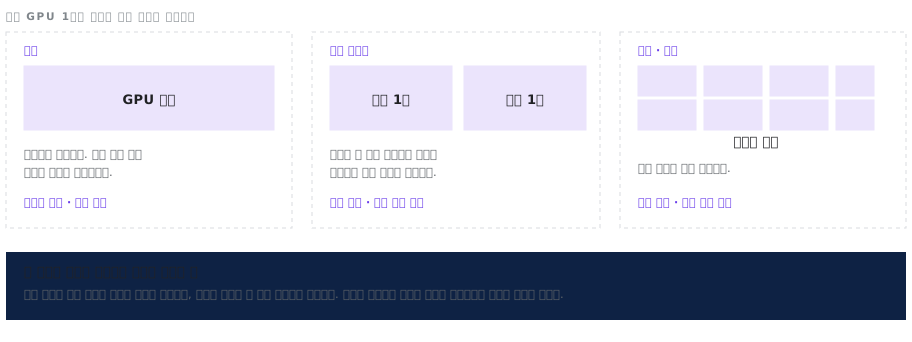
GPU partition sizes applied differently to training, inference and development
Components

The four components of Private AI Foundation

Private AI Foundation runs NVIDIA AI Enterprise and Private AI Services on VMware Cloud Foundation. Below is how each component works and what Softworks decides beforehand.

01

GPU Resources

Partition GPUs and allocate them across multiple workloads

Physical GPUs are partitioned and assigned to multiple virtual machines, or several GPUs are combined for a single workload. Utilization and memory usage are monitored together in VCF Operations.
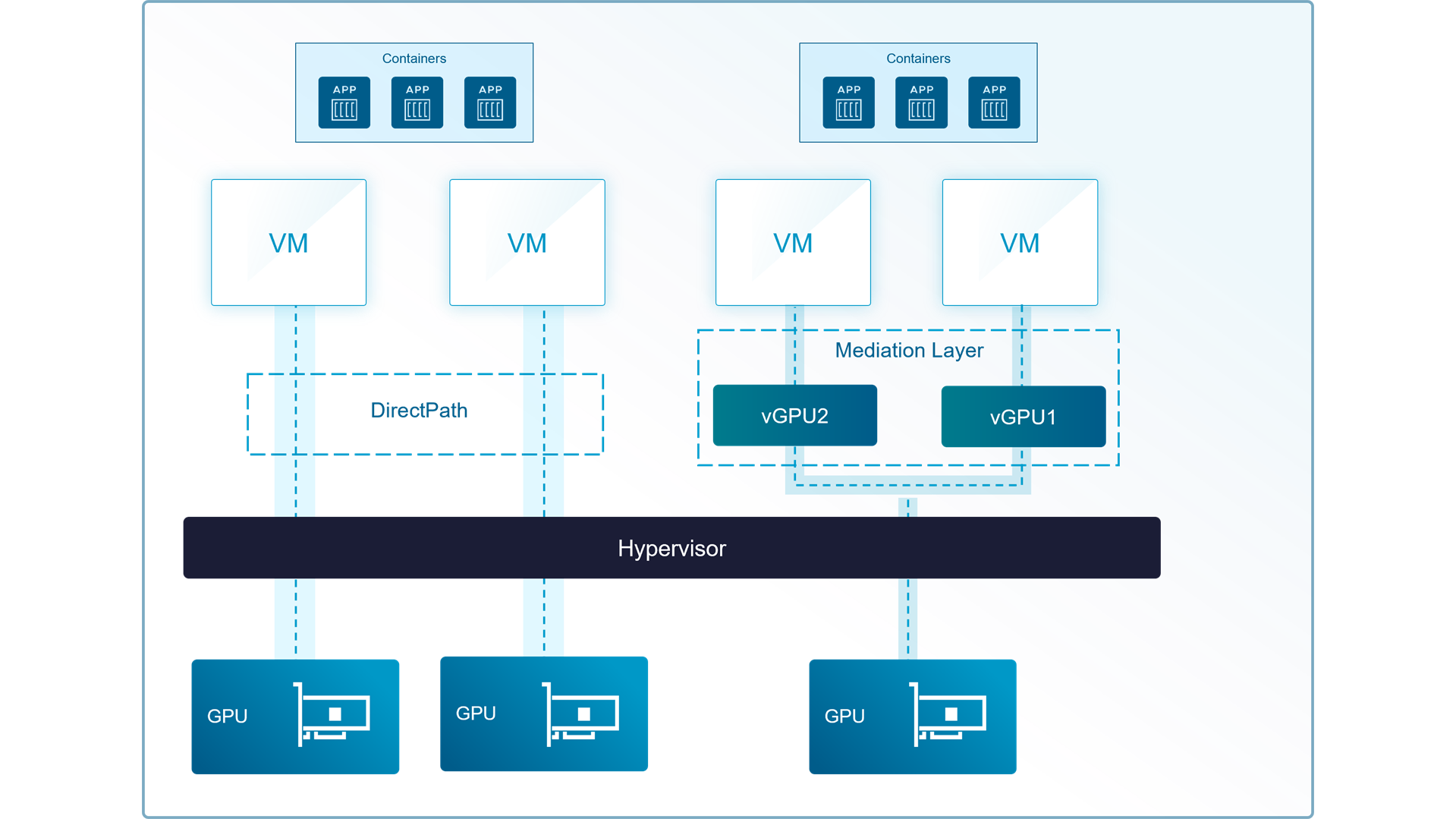
The difference between attaching a whole GPU (DirectPath) and partitioning and sharing it (vGPU)
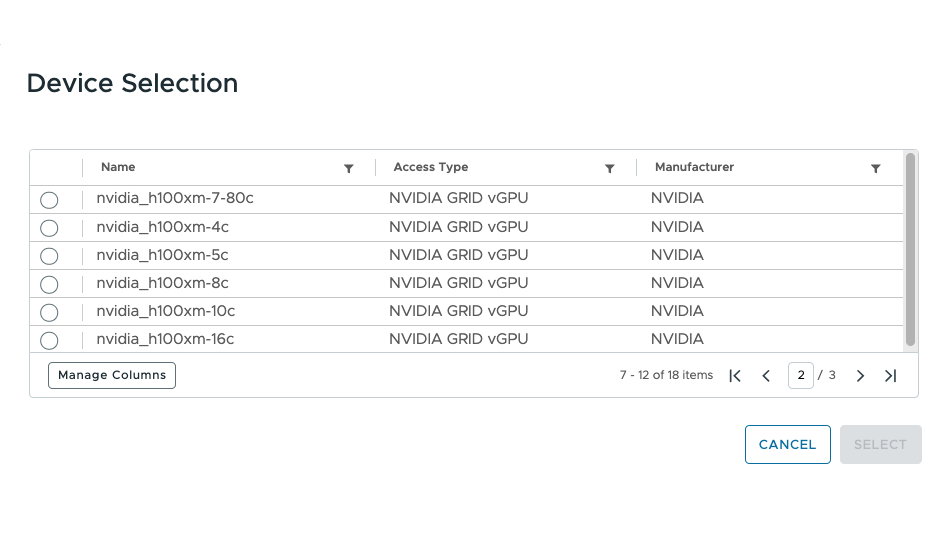
Selecting a GPU profile to assign to a virtual machine (the number at the end of the name is the memory size)
What Softworks Does

From development and validation to model inference and large-scale training — we eliminate the resource waste and bottlenecks that come from applying a single policy to everything. Softworks analyzes the characteristics of each use case and tailors GPU virtualization and partition sizes accordingly: fine-grained partitions for efficiency in development, and performance-maximizing configurations for inference and training.
02

Model Store & Runtime

Register a model in one click and use it right away

Securely store validated AI models and deploy them quickly as live services. Load the AI you need, from text generation to embedding models, while business users pick models from a catalog and use them right away.

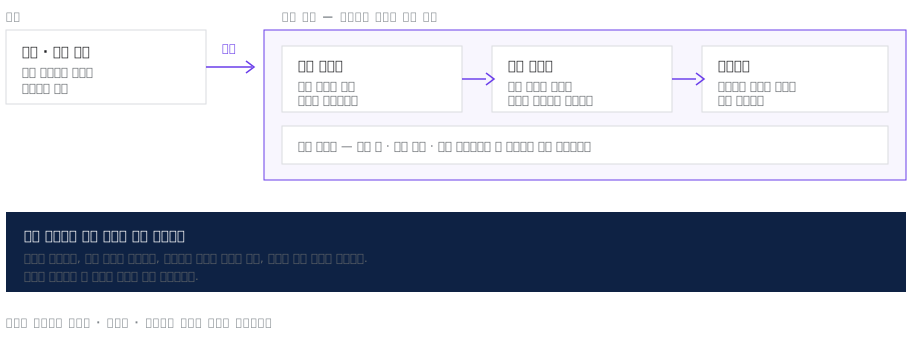
The path an external model takes through import review, registration in the internal repository, and deployment as a service
What Softworks Does

Before selecting a specific model, we first establish a reliable model replacement process. The models you use will change with trends and goals, but the standard process of registration, validation and replacement stays the same. We also set target response times for each service in advance and work backward from them to size compute resources accurately.

03

Vector Database & Data Indexing

Prepare internal enterprise data so AI can understand it immediately

Original documents are kept in secure storage, then converted into a form AI can understand (vectors) and stored in a dedicated database. When a user asks a question, AI quickly finds and references the most relevant internal information, delivering accurate, reliable answers.

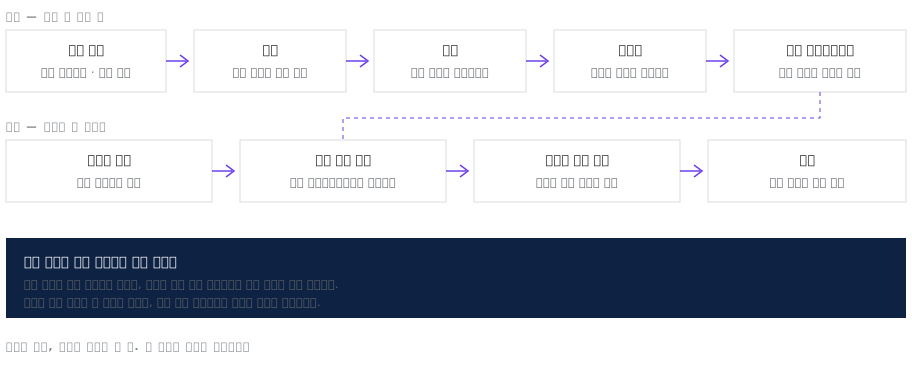
The pre-indexing stage and the retrieval stage when a question arrives
What Softworks Does

We work with business units to decide clearly which documents to include in AI search and how often to update them. To keep sensitive information from leaking when documents with different access permissions are mixed, data is strictly separated by user permission starting at the conversion (indexing) stage.

04

Agent Builder

Connect AI models to real business processes

Connects AI models to internal data and business tools to build custom AI agents that carry out complex tasks on their own, as a person would. Finished agents are deployed to production environments in a single click through VCF Automation.

The boundary between what the agent handles and what people decide, and the permission scope set at that boundary
What Softworks Does

Agent design is a specialized business area where Softworks stands apart. We analyze actual business procedures in detail, clearly separate what people decide from what AI handles automatically, and design a safe permission scope for AI agents on that basis.

SourceDiagrams and screenshots used to describe the components are from Broadcom's official technical documentation; some were redrawn by Softworks.

Operation & Support

Technical support continues after deployment

In AI infrastructure, models and usage patterns change together, so resource sizing done at deployment does not hold for long. The engineers who performed the deployment remain your technical support contact.

  • Regular GPU utilization reviews
  • Model replacement and version management support
  • Capacity expansion timing estimates
  • First-level incident analysis and vendor escalation
  • Annual architecture review

We combine solutions from global technology leaders with Softworks' deployment and operations expertise to power our customers' digital and AI transformation.

Start your VCF transition with an assessment

We start with an assessment of your current environment and a license impact analysis.

Request a Consultation →