
GenWorks · GPU Cluster Management & AIOps Platform

From GPU cluster deployment and operations
to AI model development and service deployment,
on one platform

Manage complex GPU infrastructure simply and reliably, and bring efficient resource operations and AI services together in one environment. GenWorks shares and allocates GPU resources flexibly across organizations to reduce idle capacity, and separates or reassigns Training and Inference environments as needs change.

3 days

Average cluster deployment time. BMC-based automated OS installation and automated Zone configuration shorten a deployment that used to take 10 days.

80%

Average GPU utilization. Cross-organization sharing and allocation with preemption-based control raised utilization from a previous 30%.

50% reduction

Idle resources. Auto-shutdown of idle notebooks and reclamation of unallocated GPU slices recover capacity that would otherwise go to waste.

KEY SUMMARY 2026 Korea Leading Company Awards, IT Solutions category (AI Infrastructure Optimization) · Selected 8 years in a row · Integrated platform for GPU cluster deployment, operations and resource allocation
Field Issues

6 recurring problems in GPU infrastructure operations

Before deciding whether you need more GPUs, we look at how your current GPUs are deployed and divided.

Challenges in the Field The GenWorks Answer
Deploying a single cluster takes ten days Automates everything from OS installation to initial server setup via BMC, and automatically configures Slurm or Kubernetes environments to match each Zone's purpose.
Department GPU allocations are managed in spreadsheets and verbal agreements Register allocations in the system as organization × Zone contracts. Quotas, terms and policies are applied exactly as contracted, and renewals and expirations are tracked.
Nodes split by department leave one team idle while another waits Nodes are not statically partitioned by department. Each department's share is guaranteed through quotas, priority and preemption, and other departments can use idle capacity.
When training ends and inference demand grows, the environment is hard to change Change Zone configurations during operation. Move resources from a training Zone to an inference Zone without stopping running workloads.
When something fails, people have to find the cause and recover manually Continuously health-checks GPUs, Kubernetes and Slurm, and automatically restarts, resets or isolates them according to policy.
Every researcher request has to go through an operator In a dedicated self-service console, researchers handle everything themselves, from creating workspaces to training, serving and checking usage. Quotas and policies are applied automatically to the console and submission forms.
Key Capabilities

Four service areas covering both operations and use

Three areas for operators (Cluster Management, Workload Management and System Administration) and a Self-Service area for data scientists.

01 · Operations · Infrastructure

Cluster Management

Manage the physical nodes of your GPU cluster by Zone

Covers the entire infrastructure lifecycle, from deployment to operations and automated failure remediation. Primary users: infrastructure operators.

  • Nodes & ZonesNode Inventory · Role AssignmentBMC scan reconciled against license inventory (Serial matching) · Summary by Zone · Detection of unregistered and missing nodes
  • ProvisioningStandardized deploymentBulk OS Golden Image deployment (Ubuntu, RHEL) · Automated cluster configuration and worker scale-out per Zone · Real-time deployment and configuration logs
  • Health & RemediationAutomated Fault RemediationContinuous GPU, K8s and Slurm health checks · Policy-based automatic recovery and isolation (restart, reset)
  • MonitoringIntegrated MonitoringIntegrated GPU, K8s, Slurm and power monitoring · Node health, GPU temperature and resource usage · Severity-based alarms (email, Webhook)
  • GPU PartitioningMIG Instance ManagementMIG profile configuration and templates · Unassigned slice alerts and resource reclamation
  • Power & RackPower · Rack OperationsBMC power control · Policy-based scheduled power operations · Rack layout, power usage and expansion headroom
02 · Operations · Resource Allocation

Workload Management

Controls logical allocation and execution of workloads

Register contracts in the system, monitor and intervene in all workloads, and set the rules for resource use through queues and scheduling policies. Primary users: GPU resource administrators.

  • DashboardReal-Time WatchpointsGPU utilization (overall and by Zone) · Queue backlog · Detection of long idle time, failure spikes and upcoming expirations
  • WorkloadsFull workload controlComplete lists by organization, user and type · Forced termination, priority adjustment and requeuing · Audit logs for every intervention (operator and reason required)
  • QueuesQueues · Scheduling policiesQueue status, ordering policies and organization mapping · Priority, preemption and default assignment rules
  • ContractsResource Contract ManagementOrganization × Zone contract registration · Allocation rate, expiration and quota threshold status · Renewal of contracts nearing expiration (Renewals)
  • ReportsPeriod-end reportsUsage statistics by organization · Utilization and queue statistics · Contract fulfillment reports · CSV/PDF export
03 · Usage · Researchers

Self-Service

Researchers work directly, without going through operators

A dedicated console where data scientists do the work themselves, from creating workspaces to training, serving and checking usage. Quotas and policies are applied automatically to the console and submission forms, so users work freely within their share without memorizing the rules.

  • HomeCurrent Status SnapshotQuota summary · Running workload summary · Notices and guidance for starting new jobs
  • WorkloadsTraining · InferenceSubmit and monitor training jobs · Deploy and manage inference endpoints · View your total GPU usage
  • WorkspaceMy workspaceJupyter and VS Code notebooks (auto-shutdown when idle) · View department allocations, contracts and expiration countdowns · Projects and a catalog of reusable assets
  • UsageUsage trackingGPU-hour trends by period, Zone and project · Department managers view data within their department
  • Notifications · HelpHeader utilitiesAlerts for job completion, quota thresholds and upcoming expirations · Built-in manual for air-gapped networks · Link to customer support channel
04 · Operations · Platform-wide

System Administration

Manages users, organizations, permissions and authentication

A cross-cutting area that manages the platform itself, included in every license configuration.

  • Users & OrganizationsUser · Organization managementIntegration with OS account and LDAP (AD) authentication sources · Organization (department) creation · Membership management with multiple affiliations
  • PermissionsPermissions · Role GatingDifferentiated roles for operators, department admins and researchers · Everyone sees the same screens; only the available actions differ by permission
  • Audit & NoticesAudit · Notices · LicensesImmutable storage of before-and-after change records and CSV export · Platform notices and alert channels · License status
Architecture

A resource model that links supply, contracts and demand

GenWorks manages GPU resources systematically by linking infrastructure (supply) and organizations (demand) through contracts (allocation). Changes to contract terms take effect immediately in resource allocation and the operating environment.

Zone
Supply

A homogeneous GPU node pool or partition. Each Zone uses a single GPU model and is classified as shared or dedicated × purpose (Training or Inference). Created and configured by Cluster Management.

Allocation
Contract

An organization × Zone resource entitlement. Quotas, terms and policies are applied to the system exactly as contracted, in two models: quota-based (shared) and node-assigned (dedicated). Managed by Workload Management.

Organization
Demand

Departments, projects and users. An organization holds members and receives allocations, and groups jobs and assets by project. Managed by System Administration through LDAP integration.

Control PrinciplesNodes are not statically partitioned by department. Control comes from quotas, priority and preemption; guarantees come from exceptions at the allocation level (dedicated Zones). Each department's share is secured through preemption, while other departments can use idle capacity beyond their quota, keeping utilization high.

Three Zone types by purpose

  • TrainingShared × AI model training. A shared Zone optimized for large-scale batch training, where quota-based allocation lets multiple organizations share capacity fairly.
  • InferenceShared × AI inference services. A shared Zone for persistent serving workloads, where inference services are deployed per endpoint.
  • DedicatedDedicated × exclusive allocation. Nodes are allocated exclusively to a specific team or purpose, supporting cases where physical dedication is a contract requirement.
Provisioning

Flexible configuration and scaling for your environment

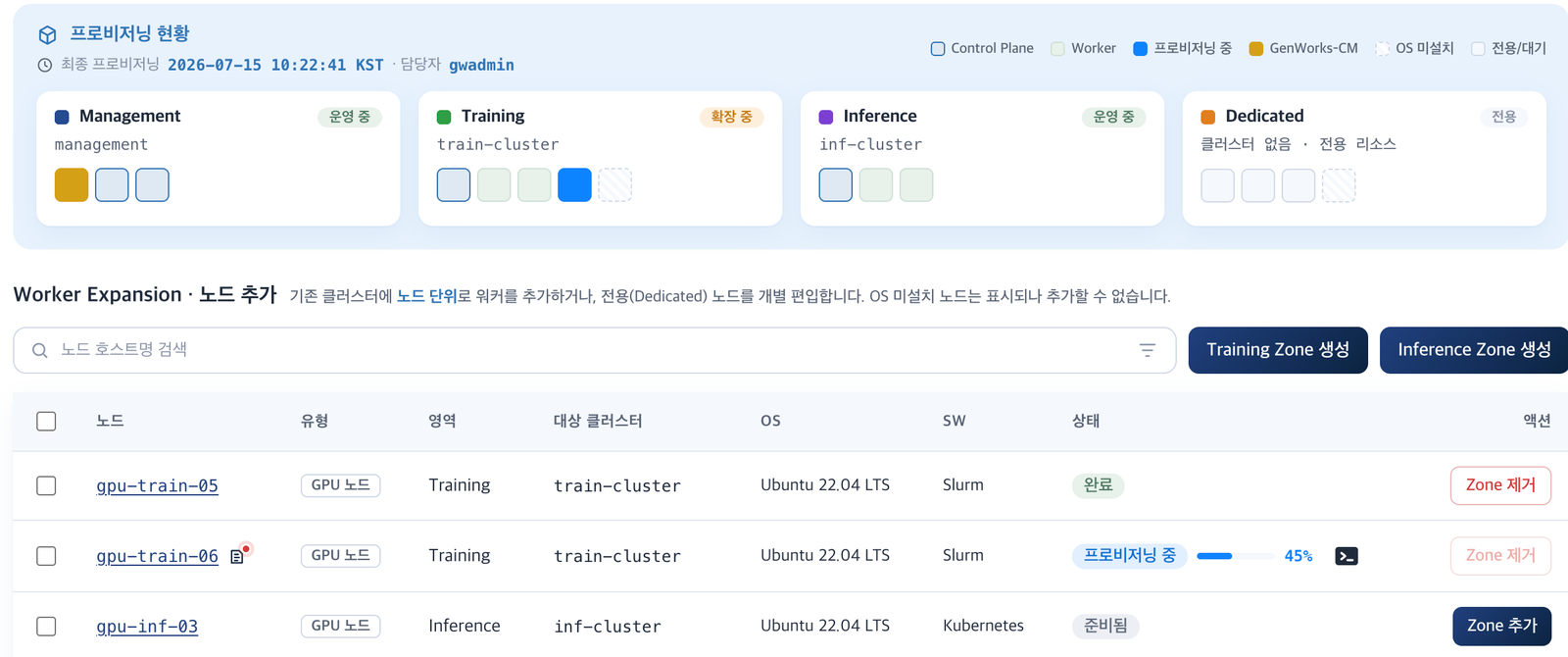
Automatically configures the software environment for each Zone's purpose. Create training, inference and dedicated Zones without separate setup work, reconfigure them in operation, and scale as needed.

GenWorks Zone Provisioning screen showing provisioning status for Management, Training, Inference and Dedicated Zones, and the node-level Worker expansion list
Zone Provisioning — Manage provisioning status by Zone and node-level Worker expansion on one screen.
  1. 01 · DeploymentAutomated OS InstallationUses BMC to automate server OS installation and initial setup, shortening cluster deployment time.
  2. 02 · ConfigurationAutomated ProvisioningAutomatically configures and provisions the software environment (Slurm, Kubernetes) for each Zone's purpose.
  3. 03 · OperationsNon-Disruptive ReconfigurationWhen training ends and inference demand grows, change the Zone configuration. Resources move without stopping running workloads.
  4. 04 · ScalabilityAutomatic Node OnboardingNew nodes are automatically configured and added to their Zone when connected, so growth in users and workloads requires no repeated deployment work.
Trust & Governance

The Foundation for Enterprise Operations

Designed around control and traceability to deliver the operational reliability enterprise environments require.

  • AuthenticationOS accounts · LDAP integrationUsers sign in with your organization's OS accounts and LDAP (AD) domain, with no separate account system. Accounts deleted from the authentication source are automatically detected and blocked.
  • Contract AlignmentContract = SystemQuotas, terms and policies are applied to the system exactly as contracted. The contract and the console always match, and a renewal directly updates the allocation, so nothing drifts out of sync.
  • TraceabilityComplete operations historyEvery operational intervention, from forced workload termination to contract registration, contract changes and policy changes, is logged with operator, target, time and reason, giving you a single source of evidence for compliance.
  • Air-GappedOn-premises · Air-gapped supportRuns entirely on your own infrastructure with no external connection. Features such as the built-in manual and CSV/PDF report export reflect how air-gapped customers actually operate.
Use Cases

One platform, different tasks for each role

All three roles share the same console layout; only the available actions differ by permission.

Infrastructure operators
Cluster Management

Automated cluster configuration · Zone-based node management · Unified monitoring · Automated failure remediation and isolation. Handle everything from the day servers arrive to incident response in one console.

GPU Resource Administrators
Workload Management

Optimal GPU placement · Resource sharing and allocation across organizations · GPU partitioning · Automatic reclamation of idle resources. Department contracts and queue policies put allocation in the hands of rules, not people.

Data scientists · Service operators
AI Model Development

AI development environments · AI model training · AI model serving · AI workload optimization. Within their own allocation, researchers launch notebooks, submit training jobs and deploy inference endpoints.

Outcomes

Expected Benefits

  1. 01Automated AllocationDepartmental GPU allocation once managed through spreadsheets and verbal agreements moves to contract-based system management, making allocation, renewal and expiration trackable.
  2. 02Maximized UtilizationQuota- and preemption-based control delivers both guaranteed capacity for each department and use of idle resources, while idle notebooks shut down automatically to reclaim waste.
  3. 03Lower Operational BurdenResearchers work through self-service, reducing request handling for operators, and automated remediation recovers failures before people step in.
  4. 04Built-In GovernanceUsage totals by organization, contract compliance reports and audit logs let the platform answer directly: "Who used how much, and was it used as contracted?"
Specifications

Supported Environments

Based on product brochure v1.0. Screens and features may vary by version.

Item Details
Deployment ModelOn-premises installation · Air-gapped support (runs entirely on internal infrastructure with no external connection)
Server OSBulk OS Golden Image deployment — Ubuntu · RHEL
Server ManagementBMC-based node scanning · Automated OS installation · Power control and scheduled power operations
OrchestrationAutomatic Slurm · Kubernetes configuration by Zone purpose
GPU PartitioningMIG profile configuration and templates · Reclamation of unassigned slices
WorkloadsJupyter and VSCode notebooks · Training jobs · Inference endpoints (persistent serving)
User AuthenticationOS accounts · LDAP (Active Directory) integration · Operator, department admin and researcher roles
Alerts · ReportsEmail · Webhook alerts · CSV/PDF report export · Audit log CSV export
Adoption & Support

From Assessment to Operations: Our Process

We validate with a pilot Zone and allocation policies first, then expand. Each phase produces documented deliverables.

Step Activities Deliverables
01. AssessmentAnalysis of GPU node inventory, utilization and allocation by departmentGPU Resource Assessment Report
02. PoCPilot Zone configuration, validation of quota and preemption policies and automated remediationPoC report
03. DeploymentNode scanning and OS deployment, Zone configuration, LDAP integration, registration of organization × Zone contractsDeployment report, Zone and allocation design documents
04. Training and TransitionRole-based training for operators, department managers and researchers; operations handoverOperations manual, user guide
05. Technical SupportUpdates, incident response, regular inspectionsTechnical Support SLA

Bring scattered GPUs together on one platform

We start with a joint review of your node inventory and current department allocations. PoCs are also available.

Request a Consultation →